Introduction to Microservice End-to-End tests with Cucumber
An introduction to the benefits of using BDD, Cucumber and its Gherkin syntax for End-to-End tests in a microservice architecture, using Java code examples.

Write stable end-to-end Cucumber tests with Awaitility to deal with asynchronous and eventually-consistent systems.
Complete 4-part guide series
An introduction to the benefits of using BDD, Cucumber and its Gherkin syntax for End-to-End tests in a microservice architecture, using Java code examples.
Create an example Cucumber project in Java with the right package structure, and add an HTTP Client to connect to the backend system.
We use a real project as a practical example of how to implement step definitions with Cucumber in Java, and the best practices to keep state between steps.
Write stable end-to-end Cucumber tests with Awaitility to deal with asynchronous and eventually-consistent systems.
The last part of the guide focuses on building end-to-end tests with Cucumber that support eventual consistency. We use the second feature, the Leaderboard, to show how to integrate Awaitility in Cucumber tests with a practical example.
The Cucumber Step Definitions that we wrote in Part 3 assumed strong consistency in the backend’s data. Right after the users send their attempts to solve the multiplication challenges, we retrieve the stats to verify them, and we check how they include the last attempt. See the code below with the Gherkin snippet showing the relevant part of this test.
When he sends the correct challenge solution
Then his stats include 1 correct attempt
The code below shows the Java implementation of the step definition for verifying the statistics.
@Then("her/his stats include {int} {correct} attempt(s)")
public void statsIncludeAttempts(int attemptNumber, boolean correct) throws Exception {
    var stats = this.challengeActor.retrieveStats();
    assertThat(stats)
            .filteredOn("correct", true)
            .hasSize(attemptNumber);
}
GitHub Repository: All the code in this post is available on GitHub: Book - Cucumber Tests. If you find it useful, please give it a star!
This is very intuitive and straightforward because systems using strong consistency are easy to test. However, the practical use case that we built in the book is not strongly consistent (and we dedicated a complete chapter to analyze why it isn’t).
Our backend architecture is using microservices and eventual consistency. See Figure 1. If you read the book, this figure should be familiar for you.
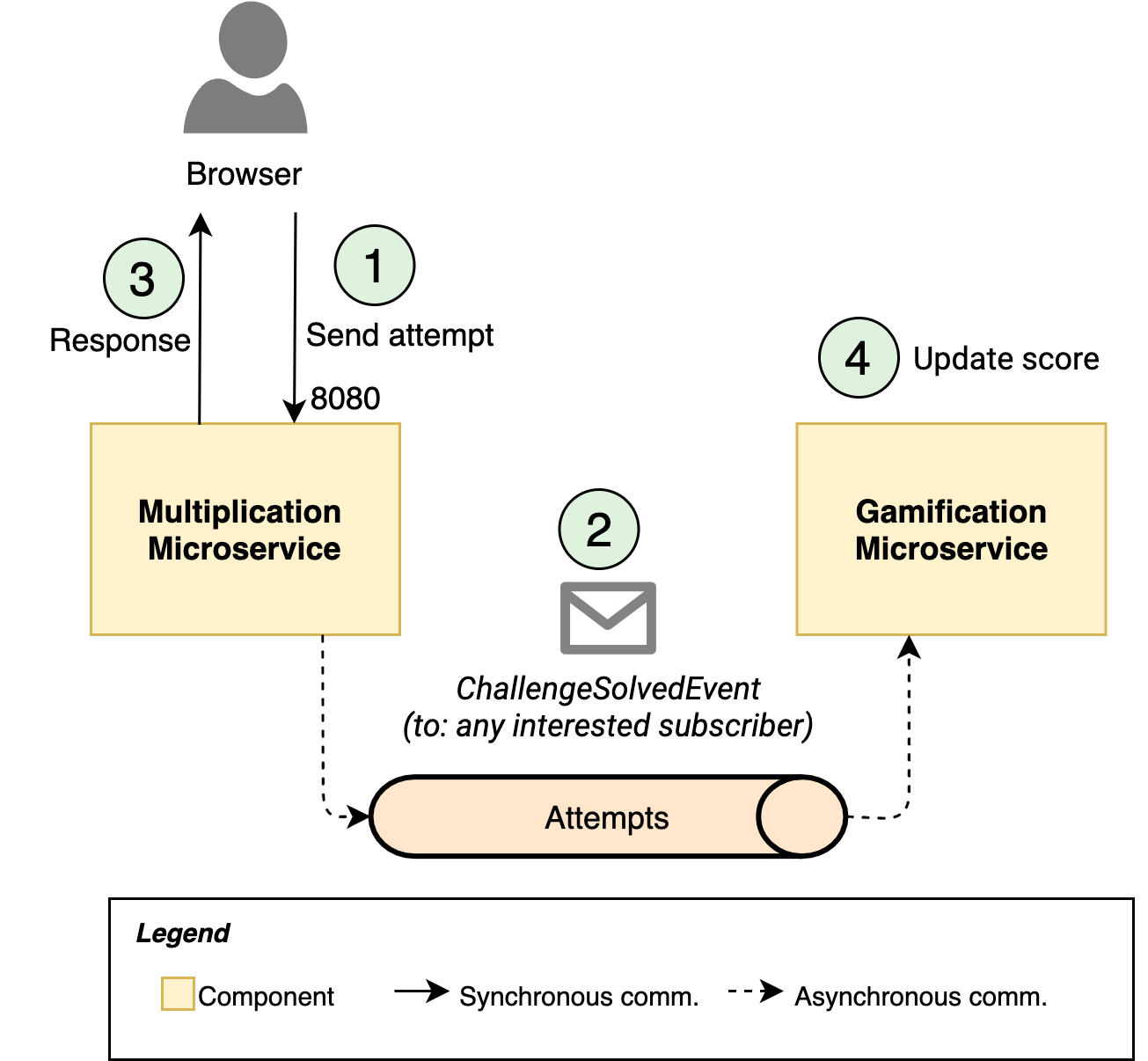
When a user sends an attempt to the backend (1), that attempt is checked and stored in the database before returning a response (3). Therefore, when we later ask for the statistics, the last attempt is included there. These two operations are under the scope of the Multiplication microservice.
In the book, we explain how we achieve loose coupling by using an event-driven approach: instead of making the challenge domain aware of the gamification domain, the first domain triggers an event (2) via a message broker (RabbitMQ) when an attempt is processed. The gamification logic uses data from the event to calculate the score and badges of the users, but this operation (4) may happen after the response to the challenge has been sent (3).
If we don’t embrace eventual consistency in our tests, we might end up building unstable tests that sometimes pass and sometimes fail. Let’s look again at a part of our second feature definition in Gherkin. See the code below.
Given the following solved challenges
  | user  | solved_challenges |
  | Karen | 5                 |
  | Laura | 7                 |
Then Karen has 50 points
* Karen has the "First time" badge
To retrieve the leaderboard, we’ll use the REST API exposed by the Gamification microservice, although this is abstracted from us thanks to the Gateway pattern. If you don’t remember the complete backend architecture, have a look again at Figure 2 in Part 2 of this guide. From the leaderboard data, we’ll extract the score and the badges.
What could happen is that the Then part of our test script calls the Gamification API before this microservice has received and processed all the RabbitMQ messages that carry those attempts (as shown in Figure 1). Karen might have 0 points, or 20, or maybe 50 if we’re lucky. Nobody knows because it depends on the environments where the tests and the system are running.
For a better understanding of the problem, we’ll demonstrate it first. Then, we’ll go through the alternatives and the best practices you can use to deal with eventual consistency in Cucumber tests.
We already included in our project the Leaderboard feature script when we described Gherkin features, but let’s have a second look at it. See the code below.
Feature: The Leaderboard shows a ranking with all the users who solved
  challenges correctly. It displays them ordered by the highest score first.

  Scenario: Users get points and badges when solving challenges, and they
  are positioned accordingly in the Leaderboard.
    Given the following solved challenges
      | user  | solved_challenges |
      | Karen | 5                 |
      | Laura | 7                 |
    Then Karen has 50 points
    * Karen has the "First time" badge
    And Laura has 70 points
    * Laura has the "First time" badge
    * Laura has the "Bronze" badge
    And Laura is above Karen in the ranking
Now that we have experience with Step definition files and we prepared the Leaderboard actor class, we can create a first version of the GameStepDefinitions class. See the code below.
package microservices.book.cucumber.steps;

import java.util.HashMap;
import java.util.Map;
import java.util.Optional;

import io.cucumber.datatable.DataTable;
import io.cucumber.java.en.Given;
import io.cucumber.java.en.Then;

import microservices.book.cucumber.actors.Challenge;
import microservices.book.cucumber.actors.Leaderboard;
import microservices.book.cucumber.api.dtos.leaderboard.LeaderboardRowDTO;

import static org.assertj.core.api.Assertions.*;

public class GameStepDefinitions {

    private Map<String, Challenge> userActors;
    private final Leaderboard leaderboardActor;

    public GameStepDefinitions() {
        this.leaderboardActor = new Leaderboard();
    }

    @Given("the following solved challenges")
    public void theFollowingSolvedChallenges(DataTable dataTable) throws Exception {
        processSolvedChallenges(dataTable);
    }

    private void processSolvedChallenges(DataTable userToSolvedChallenges) throws Exception {
        userActors = new HashMap<>();
        for (var userToSolved : userToSolvedChallenges.asMaps()) {
            var user = new Challenge(userToSolved.get("user"));
            user.askForChallenge();
            int solved = Integer.parseInt(userToSolved.get("solved_challenges"));
            for (int i = 0; i < solved; i++) {
                user.solveChallenge(true);
            }
            userActors.put(user.getOriginalName(), user);
        }
    }

    @Then("{word} has {int} points")
    public void userHasPoints(String user, long score) throws Exception {
        Optional<LeaderboardRowDTO> optionalRow = this.leaderboardActor
                .update()
                .getByUserId(userActors.get(user).getUserId());
        assertThat(optionalRow).isPresent()
                .map(LeaderboardRowDTO::getTotalScore).hasValue(score);
    }

    @Then("{word} has the {string} badge")
    public void userHasBadge(String user, String badge) throws Exception {
        Optional<LeaderboardRowDTO> optionalRow = this.leaderboardActor
                .update()
                .getByUserId(userActors.get(user).getUserId());
        assertThat(optionalRow).isPresent();
        assertThat(optionalRow.get().getBadges()).contains(badge);
    }

    @Then("{word} is above {word} in the ranking")
    public void userIsAboveUser(String userAbove, String userBelow) throws Exception {
        var updatedLeaderboard = this.leaderboardActor.update();
        int positionAbove = updatedLeaderboard.whatPosition(
                userActors.get(userAbove).getUserId()
        );
        int positionBelow = updatedLeaderboard.whatPosition(
                userActors.get(userBelow).getUserId()
        );
        assertThat(positionAbove).isLessThan(positionBelow);
    }

}
GitHub Repository: All the code in this post is available on GitHub: Book - Cucumber Tests. If you find it useful, please give it a star!
This code follows a similar approach to our previous step implementations. We use the leaderboardActor instance to keep the state between steps (as introduced in Part 3). Besides, we need to simulate several users sending attempts to the system, and for that, we leverage the UserActor class that we already created. It’s now when we really see the advantages of the actor abstraction layer: we don’t need to replicate in this step definition class all the state variables and interactions.
Except for the first step definition, which uses a Cucumber Datatable, all the other ones are simple:
userHasPoints method takes care of verifying if a given user in the leaderboard has the expected score. It updates the leaderboard and it tries to find the user. If it’s there, it’ll compare the real score with the expected value. Only if it matches, this step will pass.userHasBadge method does the same but for expected badges. Note that it’s the first time we use the Cucumber’s parameter type {string}, because badges may consist of several words. For the same reason, we enclosed the badge name within quotes in Gherkin (e.g. “First time”).userIsAboveUser takes two user names as parameters and verifies that one is above the other in the ranking. Keep in mind that we can’t verify absolute positions because we create random users in other test scenarios, so we never know what other users are already in the ranking. Therefore, we use a relative comparison.Let’s cover Datatables in a separate section.
In Cucumber, we can pass data structures to our tests. This is very convenient because we avoid step repetition in Gherkin, which improves readability. For our test cases, we can quickly define preconditions for multiple users in a more visual way. See the code below, an extract of the Leaderboard feature.
    Given the following solved challenges
      | user  | solved_challenges |
      | Karen | 5                 |
      | Laura | 7                 |
As you can imagine, we could include more rows in other test cases. Since we’re testing the ranking, this syntax helps us visualize that Laura should actually be in a higher ranking position than Karen.
In the code, we read the Datatable just by declaring it as a method argument. We don’t need to specify anything extra.
The Datatable class offers multiple methods to read the structure in multiple different ways:
The code below is an extract of the complete code of the GameStepDefinitions class. In this fragment, we see how we loop through all the rows returned by the .asMaps() method and we use the table headings to get the username, and the number of solved challenges (using Map.get() for each usertoSolved row). To achieve our goal, we send as many attempts as specified for the simulated user via the actor class (user.solveChallenge()).
private void processSolvedChallenges(DataTable userToSolvedChallenges) throws Exception {
    userActors = new HashMap<>();
    for (var userToSolved : userToSolvedChallenges.asMaps()) {
        var user = new Challenge(userToSolved.get("user"));
        user.askForChallenge();
        int solved = Integer.parseInt(userToSolved.get("solved_challenges"));
        for (int i = 0; i < solved; i++) {
            user.solveChallenge(true);
        }
        userActors.put(user.getOriginalName(), user);
    }
}After we implemented the missing step definitions, we can now run the tests again and check the results. We didn’t prepare anything to support eventual consistency yet, so we expect these tests to be unstable.
Before running the tests, you must start the backend system. As we introduced in Part 3, the easiest way to do that is to download the docker-compose-public.yml file from the book repositories, and then execute it using Docker Compose.
$ docker-compose -f docker-compose-public.yml upAfter all the services start, you can run the test suite with:
$ ./mvnw clean testIf you’re lucky, all the tests will pass. The Leaderboard feature scenario will be marked as green, and Maven gives you a result of zero failures. You may try multiple times and get the same result: everything passes.
What happens here? Did I make up the eventual consistency challenge? Not really. It means the backend system is fast enough to produce, send, consume, and process all the RabbitMQ messages before the test calls the leaderboard API. If you look back at the previous Figure 1, it means that (3 - send message) and (4 - process event) are completed before the API call. The results of the tests depend a lot on the environment where you’re running them, so even when you get all of them passing, you shouldn’t relax and think that they’re stable enough. Do not follow the “It works on my machine” motto. Tomorrow, a colleague could experience errors when running them on a different computer, or maybe your CI/CD system has fewer resources. Then, you’ll see the errors.
Let’s force the error situation to better learn how to solve it. What we’ll do is to limit the resources of the Gamification microservice. If we make its container work with a limited CPU, we expect it to be slower when processing the messages.
Edit the docker-compose-public.yml file and add the deploy YAML block shown below. We’ll limit the CPU of gamification to 0.2, which means 20% of one of the CPU cores in your machine.
  gamification:
    image: learnmicro/gamification:0.0.1
    environment:
      - SPRING_PROFILES_ACTIVE=docker
      - SPRING_CLOUD_CONSUL_HOST=consul
    deploy:
      resources:
        limits:
          cpus: '0.20'
        reservations:
          cpus: '0.10'
    depends_on:
      - rabbitmq-dev
      - consul-importer
    networks:
      - microservices
To make this work with Docker Compose without enabling the swarm mode, we have to run this time the system with the --compatibility flag. Remember to bring the system down first if you’re still running it from the previous execution.
$ docker-compose -f docker-compose-limits.yml --compatibility upThis time, it may take a while until the Gamification microservice is fully ready. Check the logs in the output of the docker-compose command to wait until you see that the service is ready. In my case, it took around three minutes:
gamification_1 | 2020-10-09 05:30:48.084 INFO [,,,] 1 --- [ main] m.b.g.GamificationApplication : Started GamificationApplication in 183.403 seconds (JVM running for 190.749)Now, run the tests again to see if we can reproduce the errors due to eventual consistency. In my case, limiting the CPU of gamification to 0.2 works, and I get sometimes test failures due to Karen not being present in the ranking, or she having a lower score than expected. See an example of the results in Figure 2, where Karen has 30 points instead of the 50 expected.
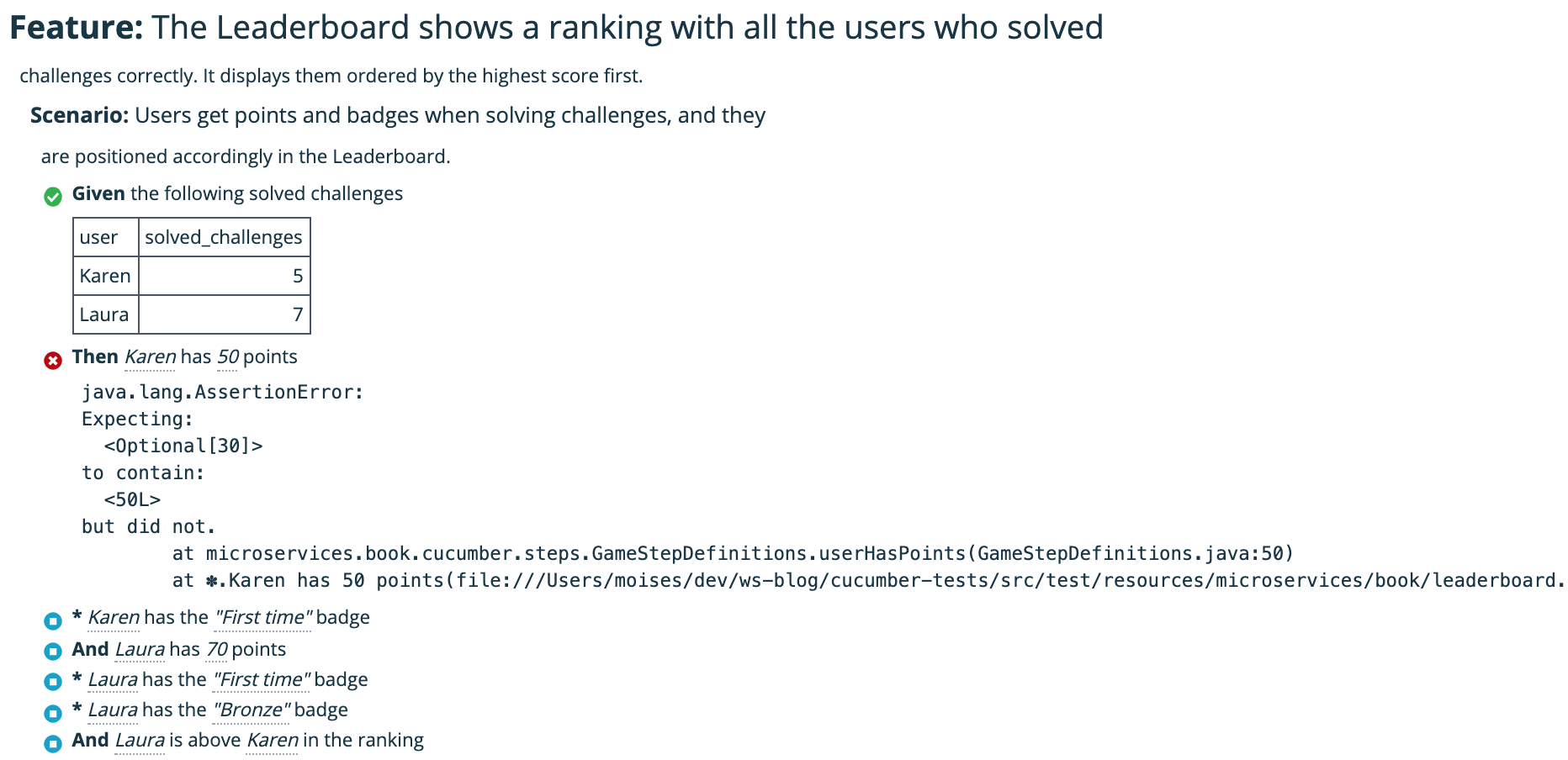
Why do we get different results each time? Because sometimes the API call is processed by Gamification before it consumed the messages, or in between processing them, or after.
We have reproduced the problem. How do we fix this? Let’s see the alternatives.
Note: if you still get passing tests, try to limit the CPU resources even more.
A simple conclusion we may extract from our experiment is that the tests we made are too fast. We send the challenges and, very quickly after that, we retrieve the leaderboard.
Sometimes, people get convinced that this will never happen in a real use case - a real person interacting with the system. In our practical case study, getting the wrong leaderboard data is irrelevant because it gets updated periodically. The user will eventually see the right score and badges.
Therefore, on many occasions, developers introduce delays in the tests to give some extra time to the eventually-consistent system to become consistent. See the code below.
@Then("{word} has {int} points")
public void userHasPoints(String user, long score) throws Exception {
    Thread.sleep(5000);
    Optional<LeaderboardRowDTO> optionalRow = this.leaderboardActor
            .update()
            .getByUserId(userActors.get(user).getUserId());
    assertThat(optionalRow).isPresent()
            .map(LeaderboardRowDTO::getTotalScore).hasValue(score);
}
When we wait those five extra seconds before retrieving the leaderboard, the test scenario passes again. However, this is a bad practice due to multiple reasons:
Luckily, there is a better way to introduce these time guards and keep the tests readable and efficient: using a polling library like Awaitility.
Awaitility is a simple Java library to test asynchronous systems. In a nutshell, it retries calls to a “condition function” until the condition is fulfilled or a timeout expires. It does it in a readable way, so our test definition steps are still easy to understand.
In our case, we can use Awaitility to poll the backend system until the assertion for the expected result passes. We’ll also define a maximum polling period of 5 seconds, but we could easily modify it when needed. See the code below for the new implementation of the userHasPoints method using Awaitility.
@Then("{word} has {int} points")
public void userHasPoints(String user, long score) {
    await().atMost(5, TimeUnit.SECONDS).untilAsserted(
            () -> {
                Optional<LeaderboardRowDTO> optionalRow = this.leaderboardActor
                        .update()
                        .getByUserId(userActors.get(user).getUserId());
                assertThat(optionalRow).isPresent()
                        .map(LeaderboardRowDTO::getTotalScore).hasValue(score);
            }
    );
}
GitHub Repository: All the code in this post is available on GitHub: Book - Cucumber Tests. If you find it useful, please give it a star!
To use the library options provided by Awaitility, we call its static method await(). There are multiple options and functions that you can use, as described in its Usage documentation. In our example, we configure it to poll for a maximum of 5 seconds with atMost(). We pass a function as a lambda via untilAsserted(), which we can use to instruct Awaitility to wait until the function’s assertion passes. This is a nice way to combine Awaitility with AssertJ. If you don’t want to use AssertJ, you could also use the generic until() method, which expects a Callable<Boolean> function or lambda that will be called until it returns true. It also accepts Hamcrest matchers, check the docs for more details.
We can modify all the steps in GameStepDefinitions that depend on eventual consistency to include Awaitility to check until the expected conditions are asserted. See the code below for the final version of the step definitions class.
package microservices.book.cucumber.steps;

import java.util.HashMap;
import java.util.Map;
import java.util.Optional;
import java.util.concurrent.TimeUnit;

import io.cucumber.datatable.DataTable;
import io.cucumber.java.en.Given;
import io.cucumber.java.en.Then;

import microservices.book.cucumber.actors.Leaderboard;
import microservices.book.cucumber.actors.Challenge;
import microservices.book.cucumber.api.dtos.leaderboard.LeaderboardRowDTO;

import static org.assertj.core.api.Assertions.*;
import static org.awaitility.Awaitility.*;

public class GameStepDefinitions {

    private Map<String, Challenge> userActors;
    private final Leaderboard leaderboardActor;

    public GameStepDefinitions() {
        this.leaderboardActor = new Leaderboard();
    }

    @Given("the following solved challenges")
    public void theFollowingSolvedChallenges(DataTable dataTable) throws Exception {
        processSolvedChallenges(dataTable);
    }

    private void processSolvedChallenges(DataTable userToSolvedChallenges) throws Exception {
        userActors = new HashMap<>();
        for (var userToSolved : userToSolvedChallenges.asMaps()) {
            var user = new Challenge(userToSolved.get("user"));
            user.askForChallenge();
            int solved = Integer.parseInt(userToSolved.get("solved_challenges"));
            for (int i = 0; i < solved; i++) {
                user.solveChallenge(true);
            }
            userActors.put(user.getOriginalName(), user);
        }
    }

    @Then("{word} has {int} points")
    public void userHasPoints(String user, long score) {
        await().atMost(5, TimeUnit.SECONDS).untilAsserted(
                () -> {
                    Optional<LeaderboardRowDTO> optionalRow = this.leaderboardActor
                            .update()
                            .getByUserId(userActors.get(user).getUserId());
                    assertThat(optionalRow).isPresent()
                            .map(LeaderboardRowDTO::getTotalScore).hasValue(score);
                }
        );
    }

    @Then("{word} has the {string} badge")
    public void userHasBadge(String user, String badge) {
        await().atMost(5, TimeUnit.SECONDS).untilAsserted(
                () -> {
                    Optional<LeaderboardRowDTO> optionalRow = this.leaderboardActor
                            .update()
                            .getByUserId(userActors.get(user).getUserId());
                    assertThat(optionalRow).isPresent();
                    assertThat(optionalRow.get().getBadges()).contains(badge);
                }
        );
    }

    @Then("{word} is above {word} in the ranking")
    public void userIsAboveUser(String userAbove, String userBelow) {
        await().atMost(5, TimeUnit.SECONDS).untilAsserted(
                () -> {
                    var updatedLeaderboard = this.leaderboardActor.update();
                    int positionAbove = updatedLeaderboard.whatPosition(
                            userActors.get(userAbove).getUserId()
                    );
                    int positionBelow = updatedLeaderboard.whatPosition(
                            userActors.get(userBelow).getUserId()
                    );
                    assertThat(positionAbove).isLessThan(positionBelow);
                }
        );
    }

}
Finally, we made our tests stable no matter in what environment is running just by adding a few lines of code.
This polling approach with libraries like Awaitility is a better way of checking results in an eventually consistent system. Try always to favor this technique over going forward without supporting eventual consistency or using fixed periods.
We reached the end of the guide! We went through the specification, design, and implementation of a suite of Cucumber tests for an eventually-consistent system.
Subscribe to the newsletter if you want to be notified with new guides are published. If you don’t have the book yet, you can purchase a copy from Amazon and many other online stores.
Complete 4-part guide series
An introduction to the benefits of using BDD, Cucumber and its Gherkin syntax for End-to-End tests in a microservice architecture, using Java code examples.
Create an example Cucumber project in Java with the right package structure, and add an HTTP Client to connect to the backend system.
We use a real project as a practical example of how to implement step definitions with Cucumber in Java, and the best practices to keep state between steps.
Write stable end-to-end Cucumber tests with Awaitility to deal with asynchronous and eventually-consistent systems.
Join hundreds of software architects and engineers getting practical insights delivered to their inbox.