
Full Reactive Stack: Conclusions
Final thoughts and conclusions on building a Full Reactive Stack application
This post is a blog version of one part of the Full Reactive Stack with Spring Boot, WebFlux, Angular, RxJS, and Eventsource Guide. The complete code sources are on GitHub.
This guide has four main chapters and an appendix:
-
The Reactive Web. This chapter guides you through the main concepts of a reactive approach and compares it to the classic web interfaces.
-
The backend. This section covers the creation of the Spring Boot application using the required dependencies and the development of the backend layers, paying special attention to the Controllers with WebFlux and the MongoDB reactive driver.
-
The frontend. It goes through the development of an Angular application that consumes the reactive endpoint created on the server’s side.
-
Conclusions. This part completes the guide, summarizing what you’ve built and comparing the Reactive and Classic Web approaches. It gives some insights on performance, testability, etc.
-
Run the app with Docker. This appendix helps you build and run the full-stack application in Docker.
All the source code (spring-boot, Angular, Docker) is available on GitHub: Full-Reactive Stack repository. If you find it useful, please give it a star!
In this final article, we run the application and see how everything works for the two different approaches: WebFlux with Server-Sent Events and MVC blocking classic. This post also compares those two alternatives in terms of user experience, performance, and ease of development.
Unlock the Full Reactive Guide: Get This Blog Series and More as a Comprehensive eBook—Available Now for Purchase! Download the full book.
WebFlux vs. Blocking (MVC): user experience
Let’s start our comparison with the most noticeable difference for Web Users: user experience. We’ll use the frontend for this comparison.
Playing the user’s role is quite simple in this application: enter values for the given parameters (pagination, page number, and size) and press either the ‘Reactive Request’ or the ‘Blocking Request’ button. That will put our implementation into practice, calling the backend services from the web page and processing the response either as small portions (WebFlux) or as a whole thing (Web MVC). The previous chapters cover this, so we won’t discuss how this works.
You’ll quickly discover that the user’s experience with the reactive case is much better for non-paginated requests and big page sizes. You don’t need to wait for the request to finish to start reading the quotes. Remember that this is a simulated scenario in which we’re forcing a constant delay per element from the server. The benefit would be even more noticeable when the server’s response time and the network latency may vary unpredictably.
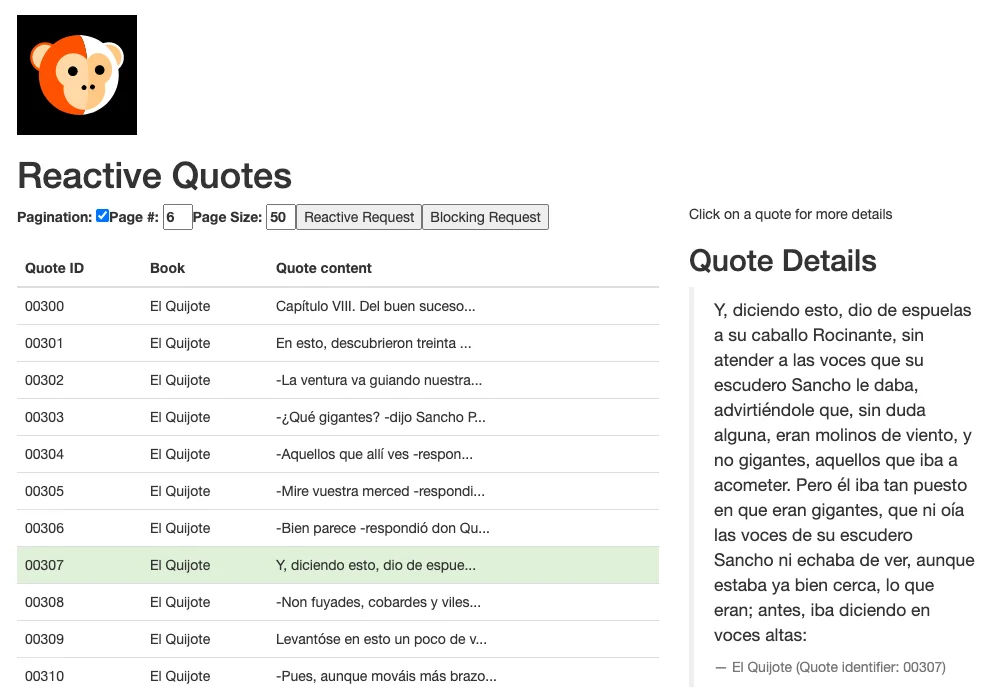
As mentioned in the first chapter, web users abandon slow sites. Following the same example we used back then, it’s much better to show potential customers a few products from your online store as soon as possible rather than wait for all the content to appear.
WebFlux vs. Blocking (MVC): performance
Interestingly enough, implementing a Full Reactive Web Stack introduces some extra delay in the total time required to retrieve a response from the server. That’s due to the additional processing needed to make the communication work. Therefore, we can’t extract conclusions by looking at the requests individually.
The Reactive Web approach shines when we measure the server’s overall performance when handling multiple requests simultaneously. In this section, we’ll explore different test configuration options and compare the results in graphs that compare the WebFlux implementation with the Web MVC one.
The results come from a benchmark test that you can run yourself. In the GitHub backend’s project folder, spring-boot-reactive-web, you’ll find the test class BenchmarkTest. Remove the @Ignore annotation and run the tests, or use your IDE to execute the benchmark.
Benchmark details
For the test, I used an Intel Core i7 @ 2.5 GHz with 1 processor and 4 cores. The backend runs from IntelliJ IDEA (not Docker). I didn’t modify the default configuration for Netty, which, in my case, runs 8 parallel server threads.
The benchmark allows you to configure:
-
The total number of requests to execute.
-
The number of requests to run in parallel (parallelism).
Every request performed by the client should take at least one second since the delay per element is 100ms and we’re asking the server for 10 quotes. The existing code runs 1, 8, 32, 96 and 768 requests four times:
-
With parallelism of 32 and invoking the reactive endpoint.
-
With parallelism of 32 and invoking the blocking endpoint.
-
With parallelism of 96 and invoking the reactive endpoint.
-
With parallelism of 96 and invoking the blocking endpoint.
To avoid potential differences in the test implementation, both reactive and not reactive requests use a WebClient, the reactive client that comes with the new Spring WebFlux. I also tried with RestTemplate for the blocking part with very similar results. The log levels of the application are in the repository so you can get some valuable information from them when running the Benchmark: threads started, locks acquired and released, etc.
Server’s Side: Requests Served per Second
As you can see in the graph below, WebFlux scores much better for a high load. It can process almost all the requests in parallel, reaching 30 requests/second when we execute 32 requests at once and 90 requests/second for 96 simultaneous calls.
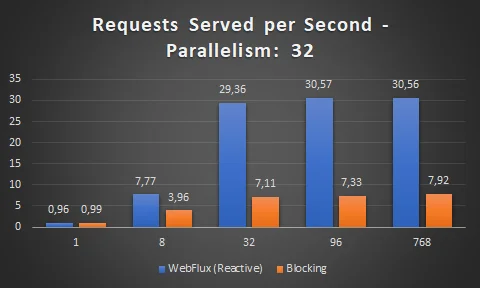
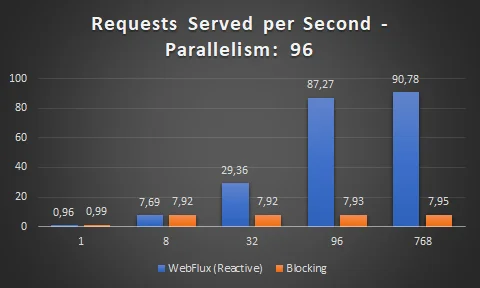
When we execute blocking calls, the server can’t process so many requests in parallel. It’s clearly limited by the number of server threads running, eight in this case.
This proves that a Reactive Web approach optimizes the server resources by unblocking the server’s threads and processing the requests separately, in parallel.
Client’s Side: Average Time per Request
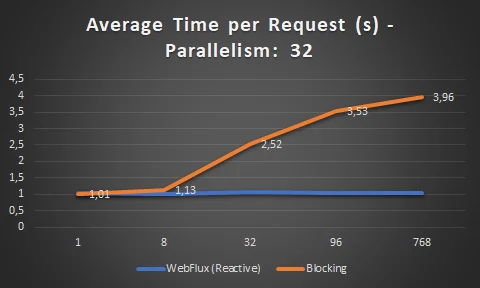
This metric also shows WebFlux as the winner option. The Netty server keeps all the reactive requests close to a minimum of one second, which is actually the consequence of the server’s ability to cope with almost every request in parallel.
On the blocking landscape, the higher the number of parallel requests, the longer the request takes to complete on average. This makes sense: given that all the server threads are busy, the remaining requests need to wait, thus increasing the average time. On the functional side, many users would be unhappy because the web page takes a long time to load.
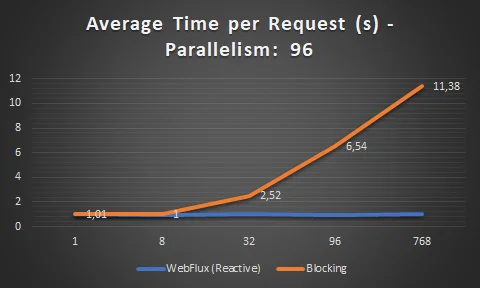
Bear in mind that this benchmark shows a clear winner because it focuses on a key server resource: the number of parallel threads available. We could make the classic Web stack perform much better:
-
A first option would be to increase the number of parallel threads available in the server, adjusting them to our needs.
-
On the implementation side, we could switch to asynchronous processing at the controller layer. This could be achieved, for example, by returning a
DeferredResultor aCallableas a response. See the Asynchronous Requests section in the Spring docs for more information.
WebFlux vs. Blocking (MVC): ease of development
We can use this most subjective angle to compare both approaches. However, it’s very important because it would be risky to blindly choose WebFlux because of its value to the user’s experience without considering other factors.
For instance, consider the knowledge of Reactive Patterns in your organization. It’s clearly a paradigm shift, and things can go wrong in many ways if people are not adequately trained in these concepts. You might end up with an amazingly performing web server that is a nightmare to maintain from the developer’s point of view.
In my opinion, the readability of code may get worse with reactive patterns. Large chains of methods with a weird indentation where the reader struggles to figure out the logic behind them unless there is good inline documentation or very good code assistance from the IDE. On top of that, there is also extra complexity associated with debugging these code blocks that do not return values immediately.
Suitability
You should evaluate if a Full Reactive stack fits your case. Do you require SQL queries to complete your Web response? Bad news: reactive support for relational databases are still at a very early stage.
Look also at the client’s side: Can your web clients switch to a reactive approach? If the answer is no, your list of advantages will become shorter.
Testing
Writing Unit and Integration tests for reactive streams with WebFlux might be tricky. The Project Reactor documentation is a good starting point, showing how you can use, for example, StepVerifier to check that your Fluxes and Monos work the way you want.
You can also find examples of Unit Tests in our backend application’s GitHub repository.
An extra inconvenience is that there isn’t a big community of developers from where you can see examples of testing with WebFlux yet. Besides, the tests are not as readable as the MVC ones and are harder to debug if something goes wrong.
Conclusions
Like any other technology choice, WebFlux (and the Reactive Web approach generally) has advantages and downsides. Don’t go for it just because it’s the new thing to do.
As we saw in this guide, WebFlux can bring performance benefits and leverage the experience you provide to your users when they’re waiting for the response’s data. On the other hand, reactive programming requires new ways of writing, testing, and debugging code, so it’s not a quick transition.
I always recommend a thorough analysis of not only your application’s requirements but also other aspects of your organization. Is the development team ready for the change? Can you solve all the challenges you’ll face? Will you really use the benefits, or are they just nice-to-haves?
For an existing project that may take advantage of it, I’d instead try it in a limited scope. You could implement this approach in a separate component (or module, or microservice). Evaluate the results; then, if you see that it brings value, you can refactor the rest of the code.
I hope you enjoyed this guide. The complete mini-book with all the blog posts plus an extra chapter is available for download.
Continue Reading This Series
This article is part of the Full Reactive Stack series:
- Part 1: Introduction
- Part 2: The Backend - Spring Boot, WebFlux and MongoDB
- Part 3: The Angular Frontend
- Part 4: Conclusions (this post)
Want the complete guide? Get This Blog Series and More as a Comprehensive eBook—Available Now for Purchase!
Get More Architecture Insights
Join hundreds of software architects and engineers getting practical insights delivered to their inbox.